Sync KitchenKit to TRMNL
Your pantry, always in sight.
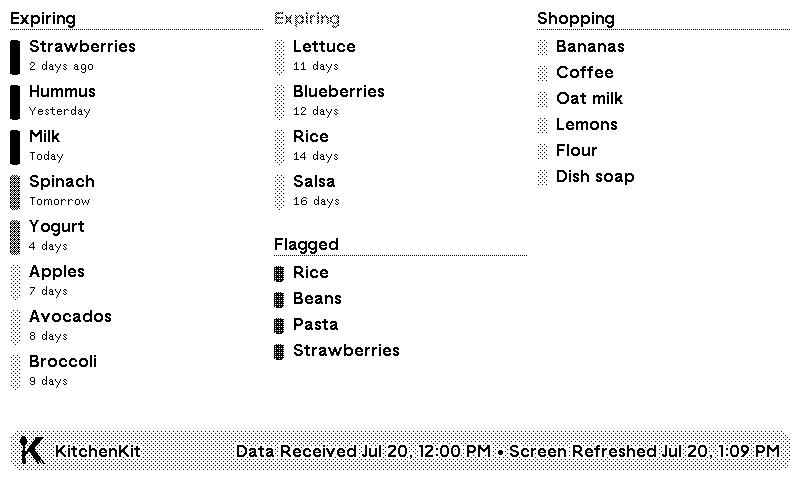
KitchenKit tracks what groceries need using and what's running low.
A TRMNL ePaper display puts the info where the whole house sees it, so you can focus on the food, not your phone.
Before you begin
Two things you need.
- KitchenKit on an iPhone or iPad
- A TRMNL device and account
Setup guide
Five steps, five minutes.
Get logged in to your TRMNL account, and have your iPhone or iPad handy.
- 1
Install the KitchenKit TRMNL Recipe
Open the KitchenKit TRMNL Recipe and click Install.
Recipes are TRMNL’s shareable custom plugins. It will appear under Private Plugin after installing.
KitchenKit TRMNL Recipe - 2
Copy Your Webhook URL
Copy the field labeled Your TRMNL Webhook URL.
- 3
Add the Apple Shortcut
Tap the button below on your iPhone or iPad, add the Shortcut, and paste your TRMNL Webhook URL during setup when prompted.
Add Shortcut - 4
Run the Shortcut
Run the Shortcut and approve the permission requests, saying “always allow.” It needs permission to read KitchenKit’s app data and contact the TRMNL web address.
- 5
Keep it Updated
The Shortcut sends a single snapshot of data each time it runs. Run it by hand whenever you like, or let a personal automation run it automatically in the background to keep things fresh.
In the Shortcuts app:- Open the Automation tab
- Tap +, then Time of Day
- Pick a time, such as 7:00 AM
- Select Run Immediately
- Choose Sync KitchenKit to TRMNL Shortcut
Good to know
The Shortcut and screen run on separate clocks.
Running the Shortcut updates the data TRMNL has. The ePaper screen still refreshes on its own playlist schedule. If the website shows new items but the device does not yet, it will catch up on its next refresh cycle.
Learn how TRMNL refresh rates work- NowShortcut sends fresh data
- Next device cycleTRMNL refreshes the screen
What the Shortcut sends
Syncing the most important data within TRMNL’s webhook limits.
Every snapshot contains four things.
Long item names are trimmed to 36 characters. The snapshot is sized for TRMNL’s 2 KB webhook limit. A TRMNL+ subscription allows 5 KB.
For advanced users
Payload reference
The Shortcut sends JSON in the following form. Array order determines display priority.
{
  "merge_variables": {
    "updated": "2026-07-19T12:00:00Z",
    "expiring": [
      {"name": "Milk", "days": 2},
      {"name": "Spinach", "days": 4}
    ],
    "flagged": ["Leftover rice", "Chicken thighs"],
    "shopping": ["Eggs", "Coffee"]
  }
}
updated is an ISO 8601 timestamp. days is the item’s relative expiration in whole days when the snapshot is sent.